Chronos
Timesheets · Leave · Reporting
Timesheets · Leave · Reporting
The hours your firm works, finally in one place.
Chronos replaces the spreadsheet each person keeps on their own desktop. Staff log time against clients, managers approve it, and the numbers are ready the moment anyone asks — without chasing anybody.
Built for accounting and audit firms. Works in the browser and on any phone.
Timesheet
Week of 7 – 13 September 2026
| Client / Activity | MON | TUE | WED | THU | FRI | Total |
|---|---|---|---|---|---|---|
Alpina Manufacturing Fieldwork | 8 | 8 | 6 | · | · | 22 |
Bereqeti Sh.p.k. Substantive Testing | · | · | 2 | 8 | 4 | 14 |
Internal work Training | · | · | · | · | 4 | 4 |
| Week total | 8 | 8 | 8 | 8 | 8 | 40/40 |
Everything the week needs
Each part exists because somebody was doing it by hand. Nothing here is decoration.
Weekly timesheets
Log hours against a client and an activity. The grid blocks future dates, caps the day at the firm’s limit, and can open Saturdays for busy season.
Approvals with the detail
Before approving, the reviewer sees the week day by day — every client, every activity, every hour, with days over eight flagged.
Annual leave that adds up
Days accrue monthly, carry over with an HR-approved expiry, and a request that goes into deficit says so before it is sent.
Who is away, at a glance
A calendar of the whole firm and a daily list of who is not in the office, with the date each person returns.
Reports that answer questions
Hours by employee, by client, and per employee per client — for any period, with charts, restricted to partners, HR and the administrator.
Nothing slips through
A register of every week never submitted, by person and by week, with one click to email each person their own outstanding weeks.
Education sponsorship
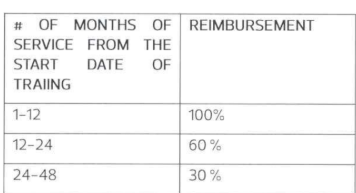
What the firm paid for someone’s studies, and how much is still recoverable if they leave — written off on a schedule you control.
Excel whenever you want it
Every report and register exports to a formatted workbook with live totals — ready to send on without cleaning it up first.
How a week actually goes
Three steps for staff, one screen for whoever approves.
- 1
Staff log their hours
Pick the client and the activity, enter the hours. Future dates and days over the limit are refused as you type, so mistakes never reach the report.
- 2
The week is submitted
One button. Anyone who forgets gets an automatic reminder on Monday morning, and only the people who actually forgot.
- 3
HR or a partner approves
The reviewer opens the week, sees every day and every client, and decides. Leave needs two signatures and produces a signed form for the employee.
Approval Center
3 waiting for your decision
Arta Krasniqi
Audit · 38h · 5 days · 3 clients
Blerim Hoxha
Accounting · 40h · 5 days · 2 clients
Rina Berisha
Audit · Annual Leave · 7 – 18 Sep
Your data stays yours
The system runs on the firm’s own server in Europe, not on a shared platform.
Permission-based access
Every screen and every action is governed by a permission the administrator controls. Audit staff cannot see accounting clients, and nobody sees a colleague’s activity.
Every change is recorded
Who changed what, when, and from where. The administrator can read the whole register or export it; everyone else sees only their own trail.
Backed up automatically
The database is backed up on a schedule and kept for months, so a bad afternoon is never a lost year.
Ready to see it with your own numbers?
Sign in with the account your administrator created, or register with your work email if self-registration is open at your firm.